 ChatGPTChatGPT
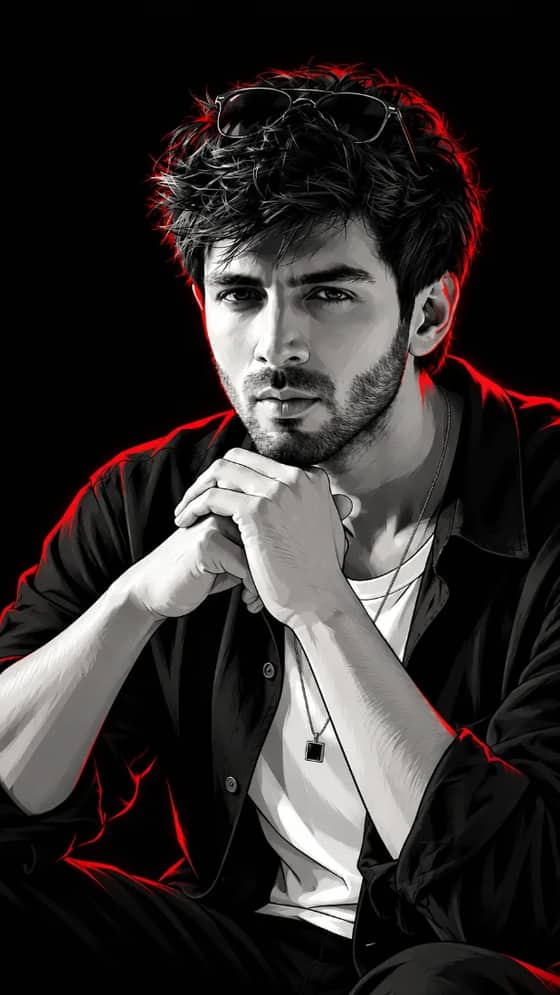
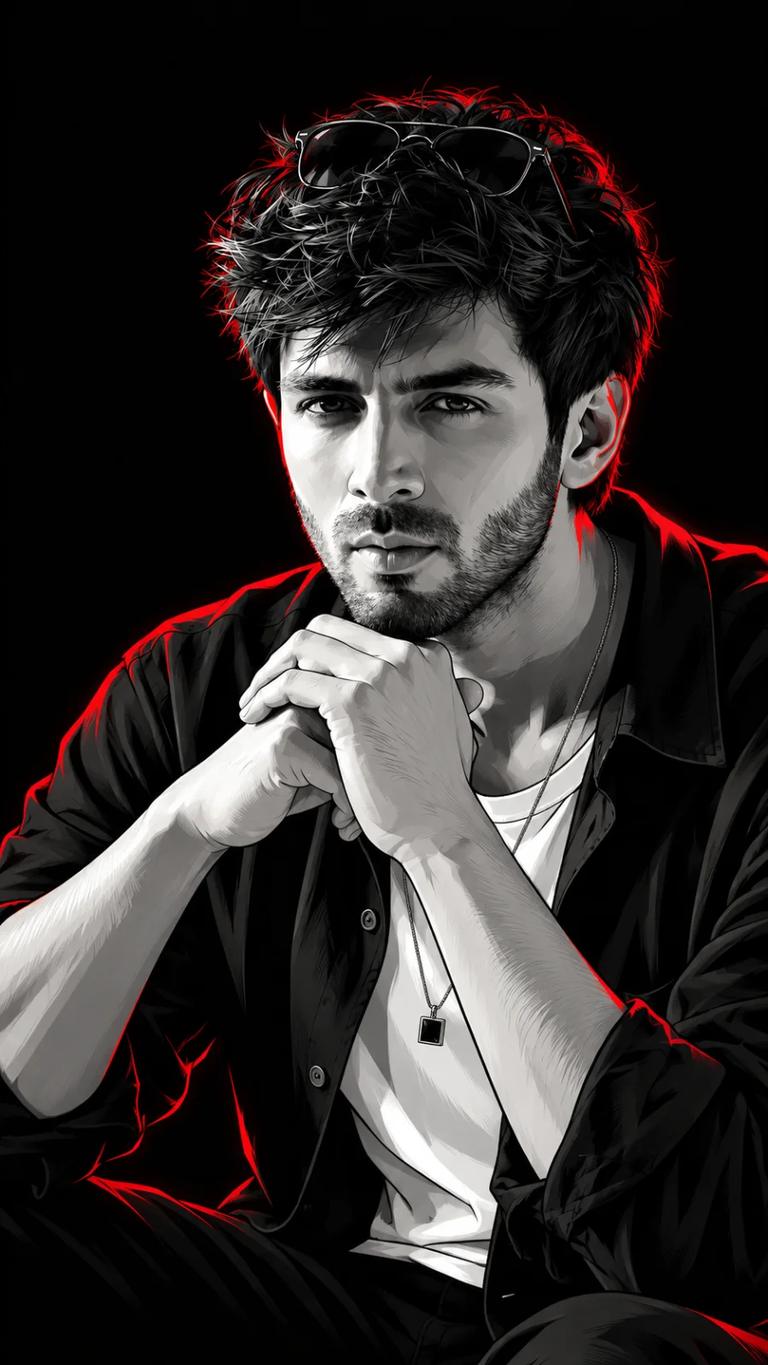
A monochrome comic-book portrait with sharp vector shading, red neon rim lighting, a black background, and modern fashion styling.

Quick workflow
Copy the prompt, customize any details, and generate in ChatGPT.
Open ChatGPT in your browser or app.
Upload your selfie to use your own face (or skip to make a new character).
Copy the prompt card above and paste it into the chat.
Press send to generate. Adjust any details you want.
Browse our curated library of tested AI image prompts or filter by your favorite tool.
Guide
Want to create a striking, stylized portrait that pops with vibrant energy? The "Red Neon Comic Book Portrait for Boys" prompt is your starting point for generating bold, graphic images with a distinctive edge. This prompt taps into a specific aesthetic: the dynamic feel of a comic book combined with the intense, glowing allure of neon reds.
It's more than just "red" – it's about the quality of red. We're talking saturated, glowing, almost electrical red hues that define shapes and cast dramatic shadows. Paired with a comic book style, you get images that feel both gritty and polished, perfect for profile pictures, character concepts, or just cool art.
Before we dive into the prompt, let's break down what makes this visual style work:
This prompt is designed to give you a solid foundation. You can use it as-is or tweak it to fit your specific vision.
Red Neon Comic Book Portrait
A dramatic comic book portrait of a young boy, sharp focus, with vibrant red neon lighting casting strong shadows. Bold line art, high contrast, cinematic, dynamic pose.
The beauty of this prompt is its flexibility. You can easily adjust elements to create countless variations.
"Young boy" is a good starting point, but you can get much more specific.
Character Details
Add descriptors for age, hair, expression, and even simple accessories.
Example:
A dramatic comic book portrait of a brooding teenage boy with spiky black hair, an intense gaze, wearing a futuristic hoodie. Vibrant red neon lighting casting strong shadows. Bold line art, high contrast, cinematic, dynamic pose.
The default implies a simple, dark background to let the neon pop. However, you can hint at environments.
Background Hints
Suggest elements that complement the neon and comic style without overpowering the portrait.
Example:
A dramatic comic book portrait of a young boy with a mischievous smirk, against a blurred cyberpunk cityscape at night. Vibrant red neon lighting casting strong shadows. Bold line art, high contrast, cinematic, dynamic pose.
"Vibrant red neon lighting" is strong, but you can play with its intensity and interaction.
Controlling the Glow
Try specifying the source or the diffusion of the red light.
Example:
A dramatic comic book portrait of a young boy, intense red neon glow illuminating his face from below. Bold line art, high contrast, cinematic, dynamic pose, against a smoky, dark background.
Sometimes, you want to push the comic book aesthetic even further.
Comic Book Flair
Add specific comic art techniques to make it feel more authentic.
Example:
A dramatic comic book portrait of a young boy, with exaggerated facial features and subtle halftone dot patterns. Vibrant red neon lighting casting strong shadows. Bold line art, high contrast, cinematic, dynamic pose, as if a single panel from a graphic novel.
Each AI image tool interprets prompts with its own unique flavor. While the core style will remain, you'll see interesting variations.
Model Nuances
Understand how GPT Image 2, Nano Banana Pro, Grok Imagine, and Qwen-Image approach this prompt.
Experiment with your preferred tool. If one isn't giving you the exact "feel" you're after, try the same prompt in another to see a different interpretation.
The "Red Neon Comic Book Portrait for Boys" prompt is a fantastic sandbox for generating dynamic, high-impact imagery. Start with the basics, then layer on your creative ideas to craft truly unique pieces.
FAQ
To nail the red neon, specify "intense red neon lighting" or "glowing red outlines" in your prompt. For the comic book feel, include terms like "comic book art style," "ink outlines," "halftone dots," or "pop art aesthetic." Be direct about the style you want, whether you're using GPT Image 2, Nano Banana Pro, Grok Imagine, or Qwen-Image. Each tool understands clear visual cues.
Just be clear in your prompt. Say "portrait of a young boy" or "teenager" and specify age or features if needed. For colors, swap "red neon" with "blue neon," "green neon," or even "multi-color neon." If you want monochrome, simply add "monochrome" or "black and white with neon accents" to your prompt. GPT Image 2, Nano Banana 2, Grok Imagine, and Qwen-Image are good at interpreting these direct instructions.
For a clean, vector art feel, use terms like "vector illustration," "graphic novel style," or "clean lines." Combine this with specific lighting instructions such as "strong rim lighting," "dramatic backlighting," or "sharp contrast." These details tell GPT Image 2, Nano Banana Pro, Grok Imagine, and Qwen-Image exactly what kind of visual impact you're after, ensuring a polished and striking result.
Next ideas
 ChatGPTModel:GPT IMAGE 2.5