/
/
 ChatGPT
 GeminiChatGPTGemini
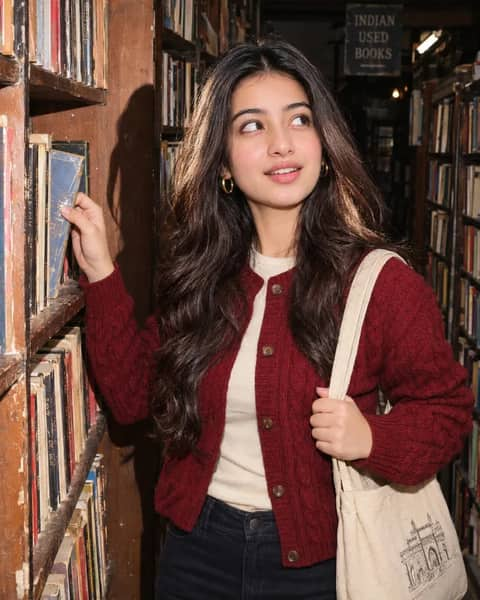
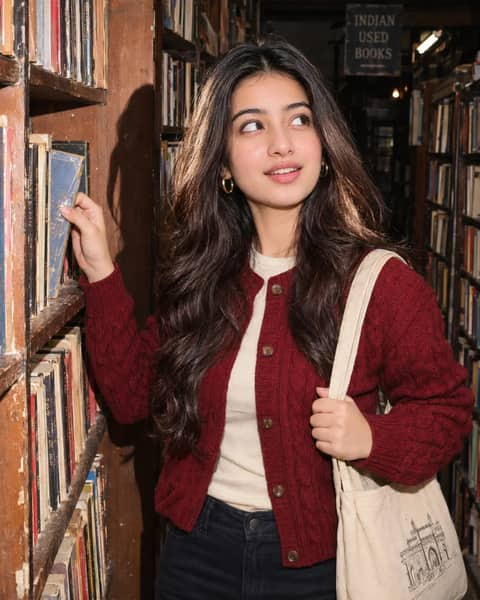
Caught mid-bookshop browse, a red cardigan and blue paperback stand out under direct camera flash. Get the look with ChatGPT or Gemini.

Quick workflow
Copy the prompt, customize any details, and generate in ChatGPT or Gemini.
Open ChatGPT or Gemini in your browser or app.
Upload your selfie to use your own face (or skip to make a new character).
Copy the prompt card above and paste it into the chat.
Press send to generate. Adjust any details you want.
Browse our curated library of tested AI image prompts or filter by your favorite tool.
Guide
This prompt generates a candid, 35mm flash portrait of a woman turning toward the lens while browsing the narrow aisle of a used bookshop. It mimics late-90s point-and-shoot camera aesthetics without looking like a degraded vintage filter. The resulting image feels spontaneous, capturing an authentic moment rather than a posed fashion editorial.
Direct on-camera flash strips away the soft, diffused look typical of default AI generations. When you set an artificial flash at eye level, it creates a fast falloff into deep shadows. That contrast is what makes this prompt work. The wooden shelves and piles of paper in the background stay underexposed, which naturally isolates your subject without needing extreme background blur.
Specifying 35mm at f/4 keeps both the subject's face and the blue paperback in sharp focus. If you set the aperture to f/1.4 or f/1.8, the book or the clothes would dissolve into mushy bokeh. At f/4, you get clean, readable details on the book spines right beside her, matching how real compact prime lenses behave indoors. The inclusion of ISO 400 introduces slight grain into the darker tones. That grain breaks up flat digital gradients and stops the woman's face from looking like smoothed plastic.
Balance the flash falloff
If the background shelves appear completely black, add "dim warm tungsten background light" to keep slight environmental context in the far aisle.
The cherry-red cardigan against the muted surroundings does heavy visual work. Most used bookshops are filled with aged yellowed paper, brown wood, and dust. Dropping a saturated primary or secondary color into that environment draws the eye straight to the woman's torso and face. The faded blue paperback gives a complementary contrast against the red knit wool without fighting it for attention.
Physical interaction grounds the subject in the scene. Static models standing in bookstore aisles look like stock photography. Having her right hand pull a book out of the shelf while her left hand grips the canvas tote gives her limbs something practical to do. It justifies her turned posture and gives her amused facial expression a clear context.
Pick GPT IMAGE 2.5 for complex hand poses
GPT IMAGE 2.5 handles the contact points between fingers and book covers with better anatomical accuracy than Nano Banana Pro.
Both supported tools interpret this prompt differently based on how their image pipelines handle exposure.
GPT IMAGE 2.5 excels at rendering micro-expressions and fabric texture. It renders the open weave of the cherry-red knit cardigan and the canvas texture of the tote strap accurately. However, its default lighting bias leans slightly toward soft studio fill. To get the harsh flash look, you must emphasize the "crisp shadow cast onto the shelf behind her" in the prompt text.
Nano Banana Pro handles hard light falloff exceptionally well right out of the box. It produces genuine on-camera flash highlights, creating a tiny white catchlight in the eyes and a realistic specular glare on glossy book covers. The trade-off is hand placement. It occasionally fuses fingers to the book spine or misaligns the tote strap over the shoulder, requiring an extra roll or two to get the anatomy clean.
Direct flash can trigger specific failure modes across both generators.
Next ideas
 ChatGPTModel:GPT IMAGE 2.5