/
/
 ChatGPTChatGPT
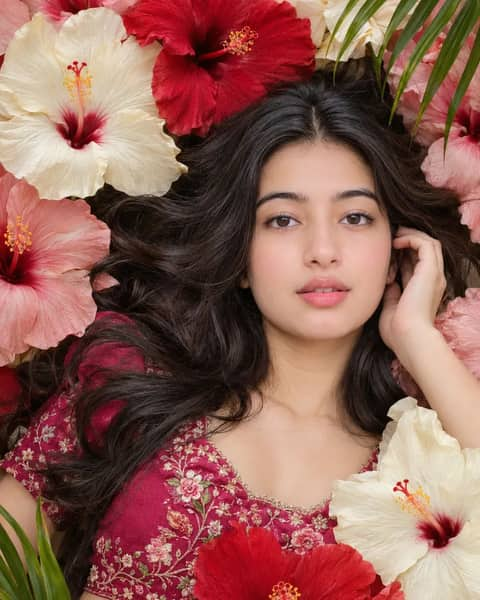
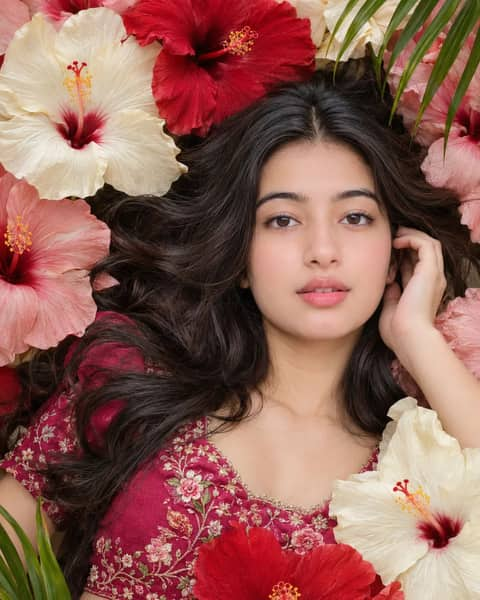
Red, ivory and blush hibiscus surround loose dark hair in this dreamy overhead portrait with a raspberry blouse, made for ChatGPT.

Quick workflow
Copy the prompt, customize any details, and generate in ChatGPT.
Open ChatGPT in your browser or app.
Upload your selfie to use your own face (or skip to make a new character).
Copy the prompt card above and paste it into the chat.
Press send to generate. Adjust any details you want.
Browse our curated library of tested AI image prompts or filter by your favorite tool.
Guide
This prompt builds a top-down portrait of a woman lying in a dense bed of red, ivory, and blush hibiscus petals with soft daylight hitting her face. It relies on tight focal control, clear subject boundaries, and specific color staging to keep the person from getting swallowed by the bright floral background.
Shooting straight down creates immediate composition problems in AI image generators. Left on default settings, tools love to center the face like a passport photo and scatter random petals across the nose and forehead.
Shifting her head right of center breaks that rigid symmetry. It leaves breathing room for the dark hair to spread across the left side of the frame, which gives the image visual weight. Specifying giant hibiscus petals is just as important as the placement. Small flowers turn into visual static. Giant petals act as clean color blocks that cup the shoulders and frame the face without cluttering the foreground.
The 50mm focal length at f/2.8 does specific technical work here. A wider 24mm or 35mm view bends the edges of the frame and makes the forehead look swollen from above. An 85mm lens flattens the shot too much and cuts out the corner palm fronds. At 50mm, her facial features stay true to life, while f/2.8 keeps both her eyelashes and the top layer of hibiscus petals sharp before dropping the lower floor into a soft blur.
Specify petal scale to stop AI from shrinking flowers
Always describe the flowers as "giant" or "oversized" in top-down portraits. If you just write "hibiscus flowers", image models generate dozens of tiny blossoms that crowd the subject and clutter the frame.
Red flowers against a red blouse will turn into a messy crimson puddle if you don't separate them. Choosing a raspberry shade pulls the clothing slightly toward cool magenta, giving it immediate contrast against the warm scarlet hibiscus petals.
Mentioning embroidery forces the model to render physical thread lines, tiny highlights, and raised stitching. That surface texture prevents the shirt from turning into flat digital paint. The ivory and blush petals do similar work around the neck and jawline. Placing softer, pale petals near her face creates a clean buffer between the skin and the deep red background tones.
Lock directional coordinates in GPT IMAGE 2.5
GPT IMAGE 2.5 follows geometric directions like "body angled in from lower left" and "palm fronds enter only from top right" far better than other engines. It keeps the corner greenery where it belongs instead of scattering leaves across the subject's face.
Both supported tools handle this prompt well, but their outputs look quite different.
GPT IMAGE 2.5 handles reference face matching and exact placement with high accuracy. If you pass an uploaded face reference, it holds onto facial proportions, hairline shape, and eye distance without drifting. It also follows negative instructions well. Tell it to keep one hand out of frame, and it won't invent random floating thumbs near her collarbone. The lighting tends to be clean and photographic, though you sometimes need to prompt for skin texture to keep it from looking overly polished.
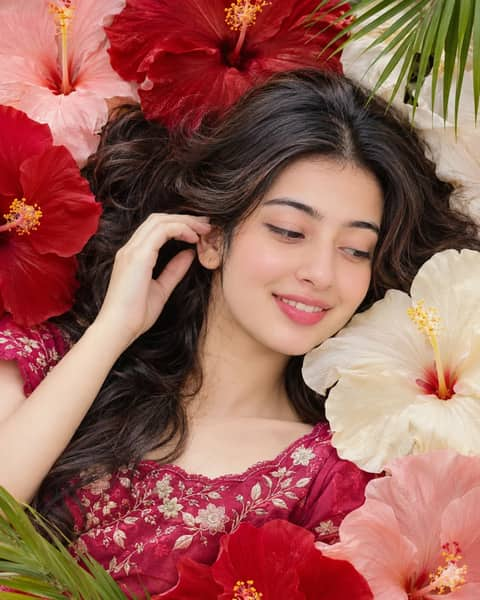
Nano Banana Pro leans harder into raw environmental realism. Its rendering of wet plant matter, thick hibiscus petals, and fine stamens looks exceptionally natural. Skin tones show realistic subsurface scattering under the diffused daylight. The trade-off is composition control. Nano Banana Pro often ignores corner restrictions, sometimes pushing palm fronds straight across her forehead or crowding the shot with extra flowers. It also tends to render smiles as slightly wider than requested in Variation B.
A heavy red background often spills unnatural color onto the subject. If your test runs look like the woman has a bad sunburn or red light reflecting across her jaw, add "neutral daylight, no red color cast on skin tones" right after the lighting description. You can also specify that only ivory petals sit directly against her cheeks and jawline.
Waxy skin happens when diffused daylight washes out shadows across the cheeks. The fix is keeping the ISO 400 and f/2.8 camera tags active in the prompt. Simulating an actual camera sensor stops the engine from applying aggressive beauty filters and forces it to draw pores, fine peach fuzz, and realistic eyelid folds.
Hands resting near the face generate the most errors in overhead angles. If fingers look merged, melted into strands of hair, or sprout extra joints, strip the hand entirely. Change the prompt line to "both arms resting flat alongside torso, hands hidden beneath large petals". This keeps the focus entirely on her face and hair without wasting time trying to fix broken finger geometry.
Next ideas
 ChatGPTModel:GPT IMAGE 2.5