/
/
 ChatGPT
 GeminiChatGPTGemini
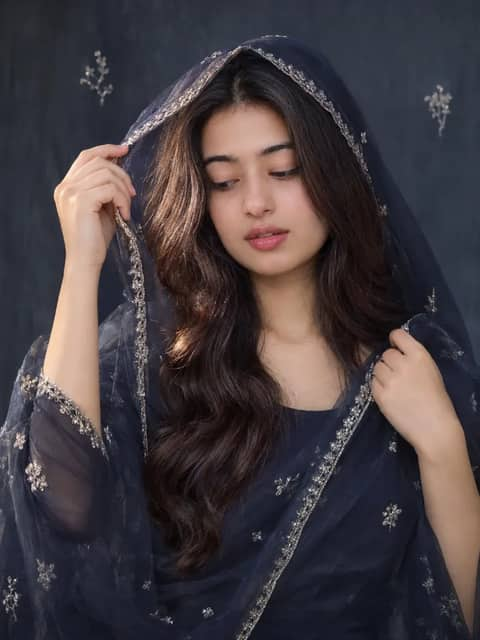
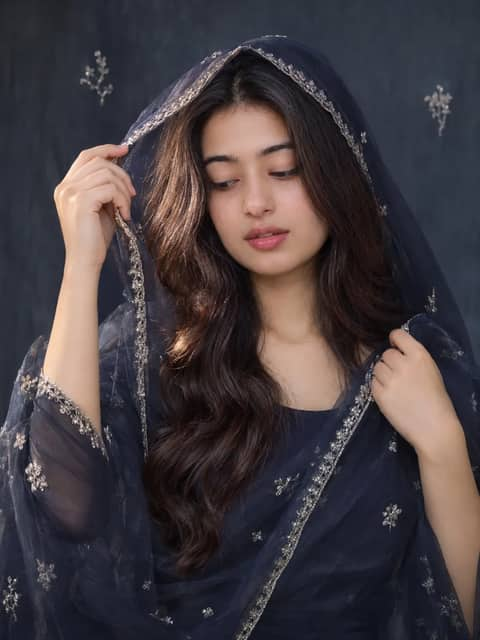
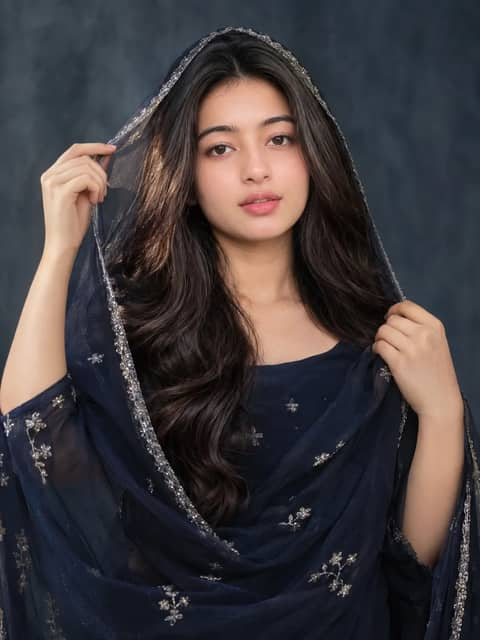
A sheer navy organza dupatta with fine silver embroidery delicately frames the face in this soft traditional portrait for ChatGPT or Gemini.

Quick workflow
Copy the prompt, customize any details, and generate in ChatGPT or Gemini.
Open ChatGPT or Gemini in your browser or app.
Upload your selfie to use your own face (or skip to make a new character).
Copy the prompt card above and paste it into the chat.
Press send to generate. Adjust any details you want.
Browse our curated library of tested AI image prompts or filter by your favorite tool.
Guide
This prompt produces a waist-up studio portrait of a woman draped in sheer navy organza, using directional side lighting to balance deep fabric shadows against natural skin texture. It relies on specific optical camera settings and textile definitions to avoid the synthetic, airbrushed look common in AI-generated ethnic wear.
Organza behaves differently than silk or cotton. It catches directional light while letting darker backgrounds show through its weave. When you prompt for "navy organza," the model needs clear instructions on where the light hits; otherwise, it turns the fabric into opaque blue plastic.
Setting the main light to camera left creates a natural falloff. The light hits the crest of the dupatta folds, illuminates the silver border, and leaves the under-layers in shadow.
To keep the silver details clean:
Keep the light source strictly on one side
Splitting light across both sides flattens the translucent layers of the organza. Keep your key light angled from camera left so the folds cast natural shadows across the neck and shoulder.
Standard prompts often yield waxy, flat skin tones because image generators over-compensate on female portraits. Adding specific camera mechanics grounds the image in real-world optics.
Specifying a full-frame 50mm lens at f/2.8 balances depth of field with subject separation. An aperture of f/2.8 is narrow enough to keep both the face and the front edge of the dupatta sharp, while gently softening the background embroidery. Pushing the aperture wider, down to f/1.4, often causes the AI to blur the embroidery along the cheek into an unreadable smear.
Setting the shutter speed to 1/250s and sensitivity to ISO 400 prompts the image engine to simulate real sensor noise. This subtle noise breaks up smooth pixel gradients across the forehead and cheeks, giving the skin natural pore structure without needing explicit negative prompts.
Both supported image tools handle this portrait differently depending on how they interpret textile weight and facial references.
GPT IMAGE 2.5 delivers cleaner textile embroidery
Choose GPT IMAGE 2.5 when you need the border embroidery to run in a continuous, unbroken line along the edge of the dupatta.
GPT IMAGE 2.5 follows the pose instructions with high accuracy. It correctly positions the right hand near the temple and pinches the fabric border without warping the fingers. The silver embroidery remains fine and thread-like. However, it tends to brighten shadows under the jawline, so you must emphasize "deep shadows under the folds" to preserve contrast.
Nano Banana Pro handles light transmission through sheer fabric better than any other model. It captures the exact semi-sheer quality of navy organza, showing the silhouette of the hair through the veil. The trade-off is hand placement. Nano Banana Pro occasionally fuses the fabric border into the skin of the fingers if the pinch pose is described too loosely.
Hands interacting with fabric often produce extra fingers or fabric growing out of fingernails.
Dark blue textiles often cast unnatural blue light across warm skin tones in AI outputs.
When models drape fabric over the head, they often drop the edge across the outer eye.
Generators often interpret "silver embroidery" as reflective glitter.
Next ideas
 ChatGPTModel:GPT IMAGE 2.5