/
/
 ChatGPT
 GeminiChatGPTGemini
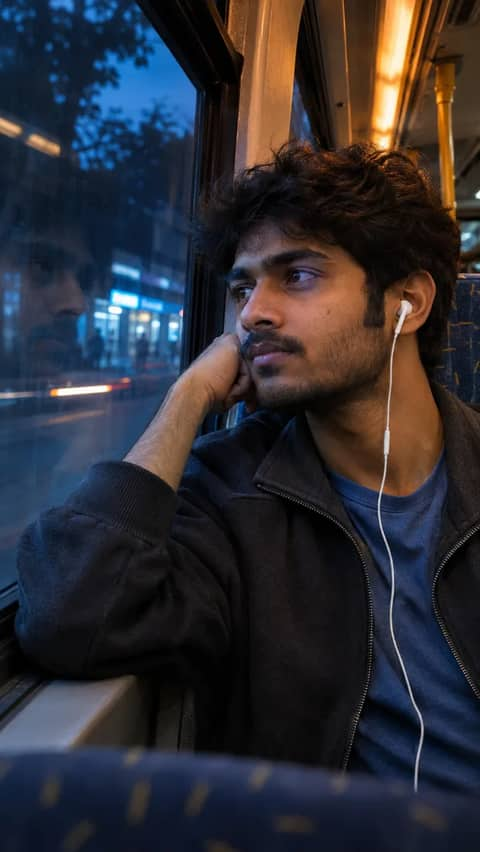
A quiet city-bus journey at blue hour, with passing lights and a faint window reflection. Capture the cinematic look in ChatGPT or Gemini.

Quick workflow
Copy the prompt, customize any details, and generate in ChatGPT or Gemini.
Open ChatGPT or Gemini in your browser or app.
Upload your selfie to use your own face (or skip to make a new character).
Copy the prompt card above and paste it into the chat.
Press send to generate. Adjust any details you want.
Browse our curated library of tested AI image prompts or filter by your favorite tool.
Guide
This prompt generates a quiet, cinematic portrait of a passenger staring out a bus window at dusk, balanced between cool exterior street signs and warm interior bus lights. You get a natural, slice-of-life frame that feels like an intentional film still rather than an AI illustration.
Shooting inside a bus is cramped. If you prompt for a wide 24mm or 28mm lens, the AI usually pulls the camera back too far, stretching the passenger's nose and packing the frame with empty plastic seats. A telephoto like 85mm does the opposite: it crops out the window ledge entirely, losing the transit setting.
A virtual 50mm lens solves that problem. It gives you a natural perspective that matches the human eye. At f/1.8, the depth of field is shallow enough to melt passing traffic into soft bokeh circles without turning the window frame into an unrecognizable blur. Specifying "from the aisle one row ahead, looking back at eye level" forces the model to frame the subject diagonally. That diagonal line adds depth to a narrow cabin. Putting the face on the right half leaves the left side open for the window and the exterior street lights.
Anchor the camera angle to prevent flat profiles
If the model keeps drawing your subject staring straight into the camera lens, add the phrase "three-quarter profile, gazing at the glass, oblivious to the viewer." It breaks the typical AI selfie gaze immediately.
Night bus shots often fail because default lighting looks flat and milky. This prompt sets up two conflicting light sources: a cool storefront outside and an amber ceiling strip inside.
The blue-hour light hits the subject's cheek and the outer edge of the face. That provides edge definition. Meanwhile, the amber overhead light warms up the charcoal jacket and the earbud cord. Specifying "restrained colour" keeps the scene grounded. Without that modifier, generators treat night city scenes like cyberpunk alleys and flood the image with oversaturated magenta and teal.
Window reflections need strict boundaries. AI image generators love drawing reflections, but they frequently draw an entirely different person outside or generate a bright, opaque clone that competes with the main face. Using "faint, correctly aligned reflection in the dark glass" tells the system that the glass is partially transparent and underexposed, keeping the reflection subtle.
Both tools handle this scene well, but their defaults differ in key areas.
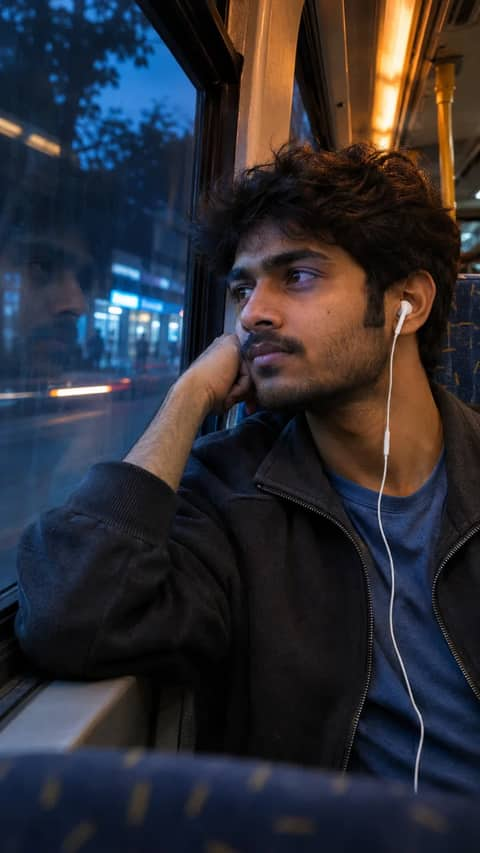
GPT IMAGE 2.5 is remarkably good at following spatial commands. It consistently respects the right-to-left layout, accurately threads the white earbud cord down into the collar, and puts the elbow on the window ledge without mangling the joint. However, its base texture can lean slightly clean. You need the "fine grain" and "ISO 1250" tags to force authentic low-light noise into the jacket fabric.
Nano Banana Pro leans naturally toward photographic film tones. It renders the street reflections and low-light shadows with deep, believable contrast right out of the box. Skin pores and stray hairs around the temple look convincing without extra nudging. The tradeoff is composition control: it sometimes centers the subject in the frame, ignoring the aisle angle, or blurs the background so heavily that the bus interior loses its shape.
Use GPT IMAGE 2.5 when pose geometry matters
Pick GPT IMAGE 2.5 if you need strict adherence to the seated pose and correct wired earbud placement. Switch to Nano Banana Pro when your priority is analog skin texture and realistic dark glass diffusion.
Low-light transit portraits introduce specific visual bugs that you can fix with quick prompt edits:
Next ideas
 ChatGPTModel:GPT IMAGE 2.5