/
/
 ChatGPT
 GeminiChatGPTGemini
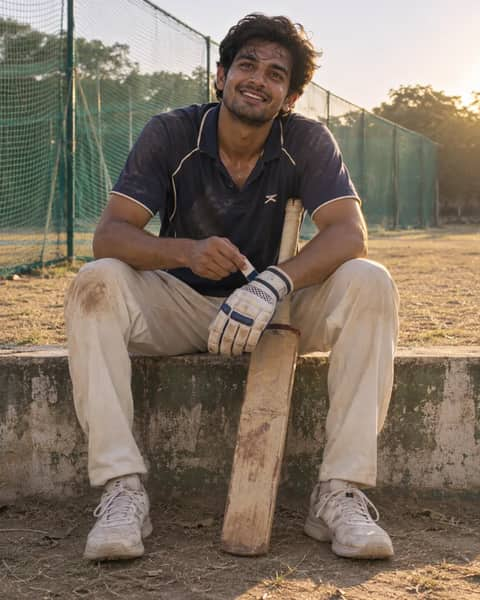
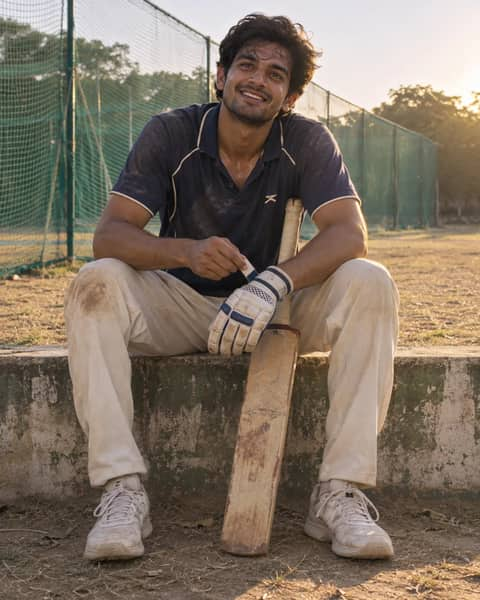
A worn cricket bat, dusty trousers and a tired half-smile tell a quiet story after the match in this ChatGPT or Gemini sports portrait.

Quick workflow
Copy the prompt, customize any details, and generate in ChatGPT or Gemini.
Open ChatGPT or Gemini in your browser or app.
Upload your selfie to use your own face (or skip to make a new character).
Copy the prompt card above and paste it into the chat.
Press send to generate. Adjust any details you want.
Browse our curated library of tested AI image prompts or filter by your favorite tool.
Guide
This prompt generates a grounded, post-game cricket portrait of an exhausted player resting on a concrete boundary wall at dusk. It drops the high-gloss commercial sports look in favor of worn leather, grass-stained cotton, and quiet physical fatigue.
Shooting from seated chest height grounds the player without turning him into an exaggerated action-hero cutout. A straight eye-level shot feels like a generic team photo. Dropping down to his level brings the dusty boundary line, scuffed batting boots, and the willow blade right into the foreground.
Setting the lens to 50mm with an aperture of f/3.5 keeps the bat toe, knees, and face sharp at the same time. Wide apertures like f/1.4 turn foreground gear into indistinct smears. You want the viewer to see the red ball marks and split wood grain on the bat face.
The physical act of peeling off batting gloves adds natural purpose to the hands. AI models struggle when hands have nothing specific to do, often generating odd clasps or extra knuckles. Giving the bare right hand a specific mechanical task—pulling the strap on the left wrist—locks down finger placement.
Keep the aperture around f/3.5
Dropping below f/2.8 blurs the cricket bat blade when the camera sits close to the ground. An f/3.5 setting gives enough depth to hold the bat grain, the stained knee, and the facial expression in clean focus while softening the practice nets behind him.
Outdoor sports prompts usually break when low evening sun creates muddy facial shadows. Placing the sun behind frame right builds a clean edge line along the shoulder and sleeve, separating the navy jersey from the dim background nets.
The prompt counters dark eye sockets by specifying open sky fill. Without that counter-balance, both GPT IMAGE 2.5 and Nano Banana Pro tend to cast heavy, unnatural shadows from the brow line down across the nose.
Washed navy and ivory piping pull the palette away from neon athletic gear. Specifying off-white rather than pure white trousers keeps the fabric from blowing out under direct low-angle sun.
Both tools handle this scene well, but they interpret physical equipment differently.
GPT IMAGE 2.5 reads multi-step gear prompts with high accuracy. It correctly renders one gloved hand and one bare hand, keeps the bat handle tucked against the inner thigh, and places the bat toe between the shoes. The fabric folds look heavy and real, though skin tones can sometimes lean slightly smoothed if you don't prompt for sweat and dust.
Nano Banana Pro captures the evening atmosphere and dry grass colors better on the first run. Backlit dust particles and sun flaring through the practice net appear natural. Its main weakness lies in cricket-specific gear: it occasionally widens the bat blade into a baseball paddle or merges the glove padding directly into the player's fingers.
Choose GPT IMAGE 2.5 for complex gear interaction
GPT IMAGE 2.5 handles multi-step physical mechanics with fewer errors. When an image calls for two hands doing separate tasks around sports equipment, it keeps the fingers, straps, and bat handle cleanly separated.
Cricket gear creates common generation errors that ruin realism. Here is how to fix them directly in your prompt text:
Next ideas
 ChatGPTModel:GPT IMAGE 2.5