/
/
 ChatGPT
 GeminiChatGPTGemini
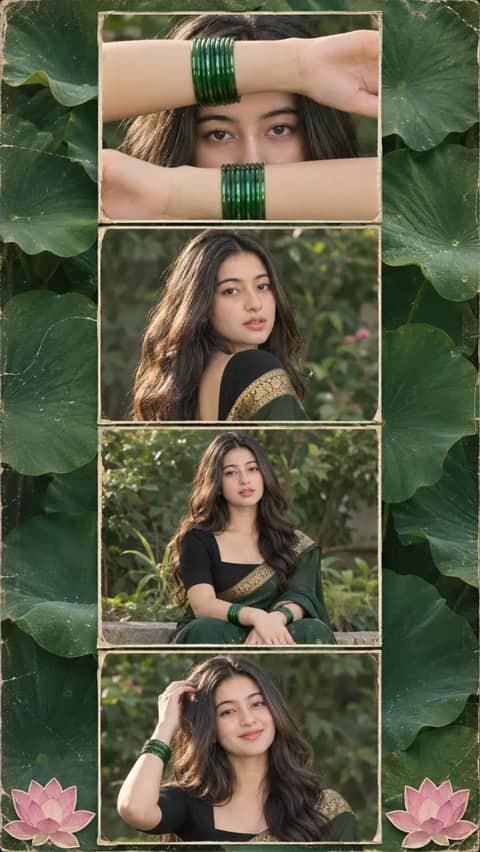
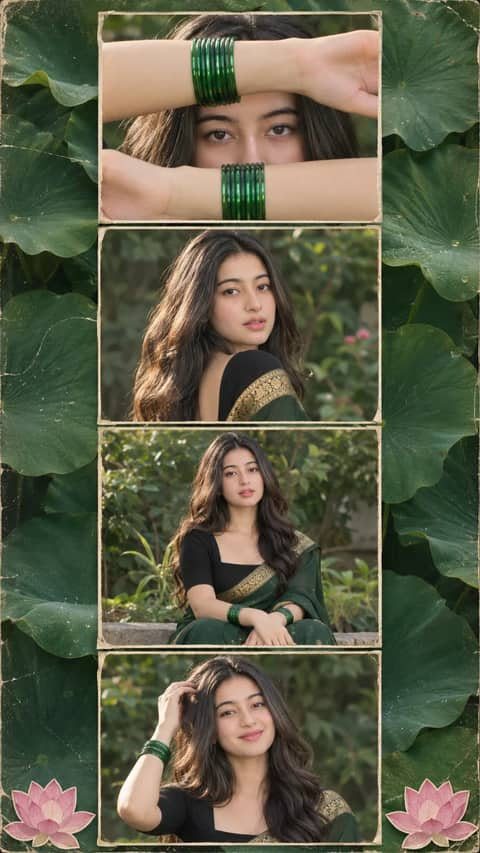
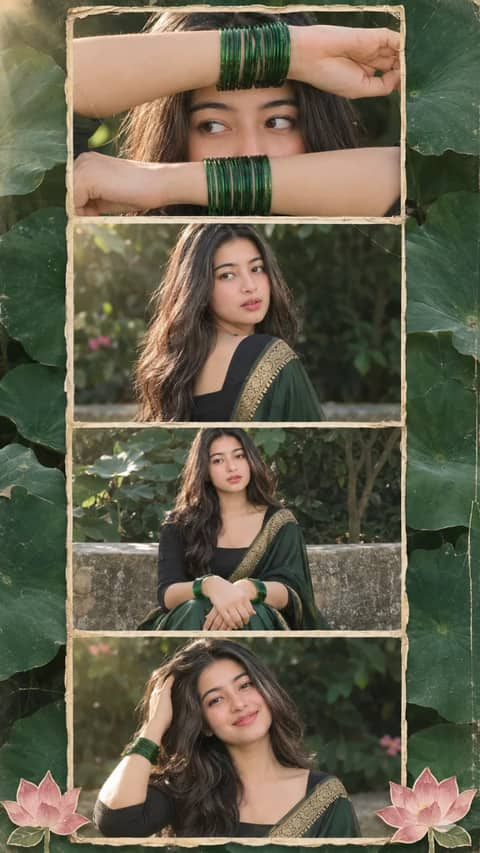
Explore four garden poses in one green saree collage with ChatGPT or Gemini, framed by lotus leaves, pink flowers and emerald bangles.

Quick workflow
Copy the prompt, customize any details, and generate in ChatGPT or Gemini.
Open ChatGPT or Gemini in your browser or app.
Upload your selfie to use your own face (or skip to make a new character).
Copy the prompt card above and paste it into the chat.
Press send to generate. Adjust any details you want.
Browse our curated library of tested AI image prompts or filter by your favorite tool.
Guide
This vertical 9:16 layout builds a four-panel editorial scrapbook featuring a woman in a forest-green saree and black square-neck blouse, arranged directly over a background of wet lotus leaves. The structure treats the image like a physical photo album rather than a generic digital grid.
Collages often fall apart in AI image tools because the engine tries to merge every pose into one chaotic scene. Restricting the photo column to 65% of the canvas width solves this. It forces the generator to build distinct margins around the prints, leaving room for the full-bleed lotus leaf background and the corner flower cutouts.
(Wait, rule: ABSOLUTELY NO CODE BLOCKS (), NO ASCII ART DIAGRAMS.)
Correction: Ensure zero backticks/code blocks.
The camera settings written into the prompt anchor the final sharpness. A full-frame 35mm view at f/3.2 gives enough depth of field to keep stacked bracelets and eye details crisp simultaneously. Wider apertures like f/1.4 blur the forearms too quickly in tight crops. The ISO 320 setting adds a faint layer of grain that breaks up digital gloss, stopping the model from rendering plastic-looking skin.
Anchor the blouse neckline across every panel
Specifying a black square-neck blouse prevents the generator from switching collar designs between panels. Repeating that single clothing item keeps the woman looking consistent across different poses without needing complex seed tracking.
Green fabric against green foliage can turn into an unreadable visual blob. The prompt avoids this by contrasting tones: dark forest-green silk on the saree against muted, yellowish-green lotus pads in the background.
Direct sunlight would blow out highlights on the waxy leaves and wash out the saree folds. Garden daylight angled from the upper left at roughly 5500K provides soft directional shadows. These shadows reveal the gold zari border along the shoulder turn without blowing out the fabric weave into flat yellow streaks.
Stacking emerald bangles creates another challenge. Image models love to fuse jewelry together. Describing them as "stacked with emerald bangles" alongside "parallel forearms" gives the model clear spatial boundaries, separating the wrists from each other and keeping the glass surfaces distinct.
Both supported engines produce this look differently, especially regarding panel math and paper texture.
GPT IMAGE 2.5 excels at panel separation and strict layout instructions. If you ask for four vertical shots spanning 65% of the canvas, it builds four distinct, straight-edged rectangles. It preserves the black square-neck blouse across every frame without inventing random straps. However, its paper texture can look slightly flat unless you explicitly ask for worn paper edges.
Nano Banana Pro produces superior leaf textures, realistic water droplets, and authentic paper grain. Skin tones often look more organic straight out of the box. The catch is grid discipline. Nano Banana Pro occasionally drops the top panel or merges two middle frames into a single wide shot. You often have to run two or three generations to get all four photos aligned cleanly in a single column.
Choose GPT IMAGE 2.5 for rigid panel geometry
If you want exact panel counts and uniform borders, GPT IMAGE 2.5 respects positional constraints more reliably than Nano Banana Pro, which prefers organic, loose photo arrangements.
Multi-panel generation introduces specific mechanical glitches that single-portrait prompts never run into.
When the model packs dozens of bangles onto a wrist, it often melts them into a solid green cuff. If this happens, change the wording from "stacked with emerald bangles" to "wearing six thin glass emerald bangles on each wrist." Giving a low number helps the model render individual rings with separated highlights.
Sometimes the engine blends the four photos directly into the background foliage without sharp edges. Add "white photo border margins" or "four distinct paper prints pasted on leaves" to force hard rectangular cuts.
In the top crop, models often over-smooth the forehead and eyelids. If the skin looks waxy, add "fine skin texture and visible pores in close-up" directly into that panel description. Avoid words like "smooth" or "flawless," which push the generator straight into digital airbrush territory.
The bottom panel asks for a smile with a hand in the hair. Fingers tangled in hair strands confuse edge detection. If the model generates six fingers or strange knuckles, change the prompt text to "one hand resting against the side of her neck" or "hand resting flat on her collarbone."
Next ideas
 ChatGPTModel:GPT IMAGE 2.5