/
/
 ChatGPTChatGPT
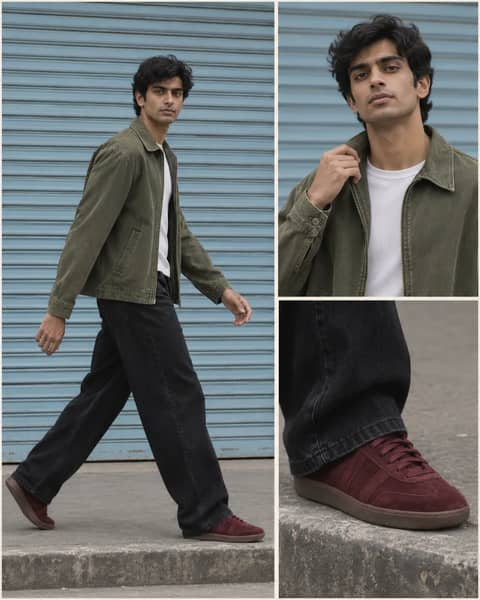
Three streetwear shots, one olive jacket. ChatGPT brings a walking pose, collar close-up and burgundy sneaker detail into one lookbook.

Quick workflow
Copy the prompt, customize any details, and generate in ChatGPT.
Open ChatGPT in your browser or app.
Upload your selfie to use your own face (or skip to make a new character).
Copy the prompt card above and paste it into the chat.
Press send to generate. Adjust any details you want.
Browse our curated library of tested AI image prompts or filter by your favorite tool.
Guide
This prompt produces an asymmetric 4:5 streetwear lookbook collage featuring a full-length walking shot beside two close-up detail crops of an olive canvas jacket, wide denim, and burgundy suede sneakers against a pale blue shutter.
Getting an image generator to split a canvas into distinct panels without turning it into a chaotic comic strip is tricky. Most image models want to center a single subject. When you ask for a collage, they often mush figures together or spit out erratic border sizes.
The prompt fixes this by defining exact spatial math: "Left photo fills 60% of the width and the full height. Stack two equal rectangles on the right with thin cream gutters."
Specifying the border color as cream grounds the image. White gutters often blow out against bright clothing, while dark gutters look heavy and cheap. Giving the right panels an equal vertical split prevents the generator from squeezing the lower shoe crop into an unreadable sliver. Keep your panel count to three. Four or more panels in a single generation causes model confusion, degrading facial features and muddying fine stitching details.
Frame the walking panel with lead room
Always include "room ahead of shoe" for the full-body side view. Without that note, models frequently chop off the leading foot at the ankle or ram the subject against the left border of the frame.
Overcast daylight is the workhorse of streetwear photography. Direct midday sun creates harsh shadows under jacket hems and blows out white ribbed cotton. Soft overcast light, however, spreads evenly across coarse textiles.
Canvas needs low-contrast diffuse light to look thick. If the light source is too intense, the generator renders the jacket as slick, synthetic nylon instead of heavy matte canvas. The white ribbed T-shirt provides a bright mid-tone anchor between the pale blue background shutter and the dark olive fabric.
Specifying lens focal lengths directly alters rendering behavior:
The burgundy suede sneaker functions as the grounding color accent. Suede has a matte nap that eats light differently than smooth leather. Describing the shoe as "burgundy suede" rather than just "burgundy sneaker" forces the generator to draw tiny surface texture changes instead of shiny plastic reflections.
Both supported engines render multi-panel prompts well, but they handle composition and texture differently.
Use GPT IMAGE 2.5 for strict panel alignment
GPT IMAGE 2.5 is the best choice when clean border separation matters most. It respects the 60/40 width ratio, keeps gutters straight, and maintains facial consistency across the full-body and chest-up crops. Fabric folds look realistic, though you may need to add "film grain" if the canvas looks slightly too clean.
Nano Banana Pro shines with tactile materials. The nap on the suede sneakers and the heavy weave of the wide black denim appear noticeably rougher and more tactile. However, Nano Banana Pro can be looser with gutter borders. It sometimes drops the cream dividing line entirely or shifts the right-hand panel split to a 50/50 balance across the whole frame. If you run this prompt in Nano Banana Pro, reinforce the division by adding "distinct framed borders" to the layout sentence.
Streetwear contact sheets run into distinct failure modes during generation. Here is how to fix them when they show up:
Red and burgundy pigments often bleed into adjacent garments. If your wide black jeans develop reddish tints at the hem, separate the garment descriptions into distinct, bulleted clauses or explicitly state "unfaded neutral black denim, isolated shoe color".
When an engine draws a chest-up portrait next to a wide-angle shot, it often over-polishes the face in the close-up panel. Counter this by prompting for "natural skin pores, fine peach fuzz, matte finish". Never use words like "flawless" or "smooth".
Generators love pasting fake magazine titles or garbled text over lookbook borders. The line "Matte finish, no lettering" cuts this off. If fake branding still creeps in, place "clean borders, zero text, zero typography" at the very beginning of the layout instructions.
Next ideas
 ChatGPTModel:GPT IMAGE 2.5