/
/
 ChatGPT
 GeminiChatGPTGemini
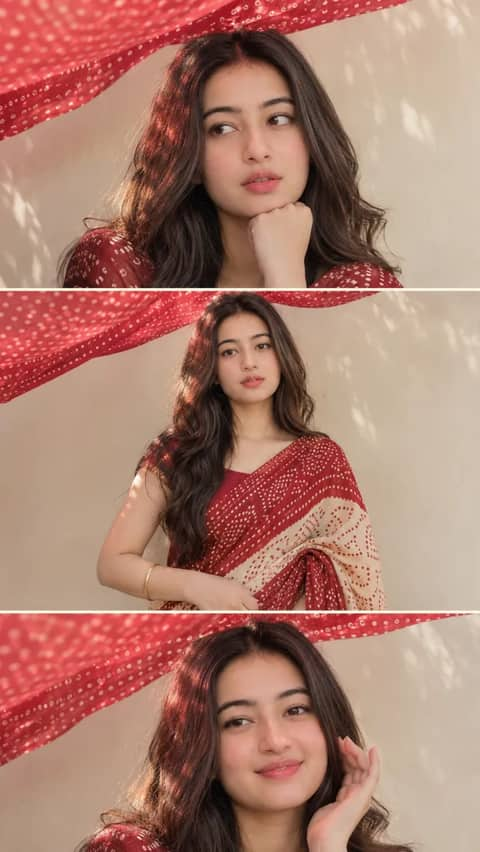
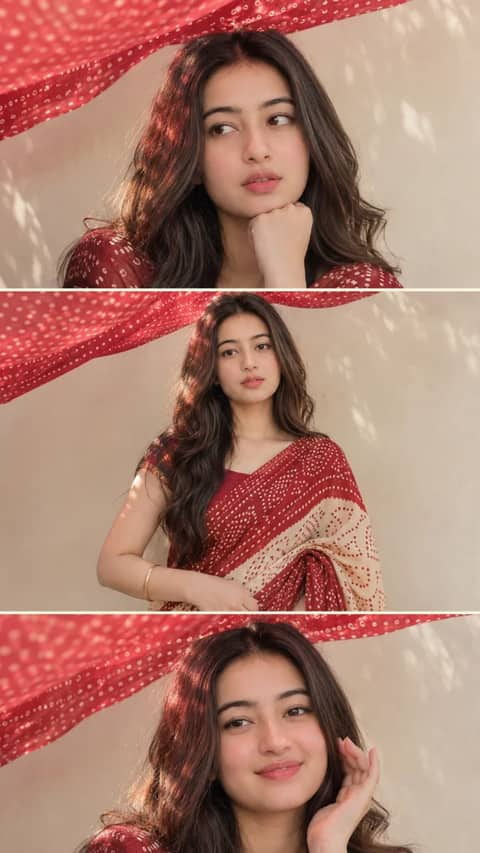
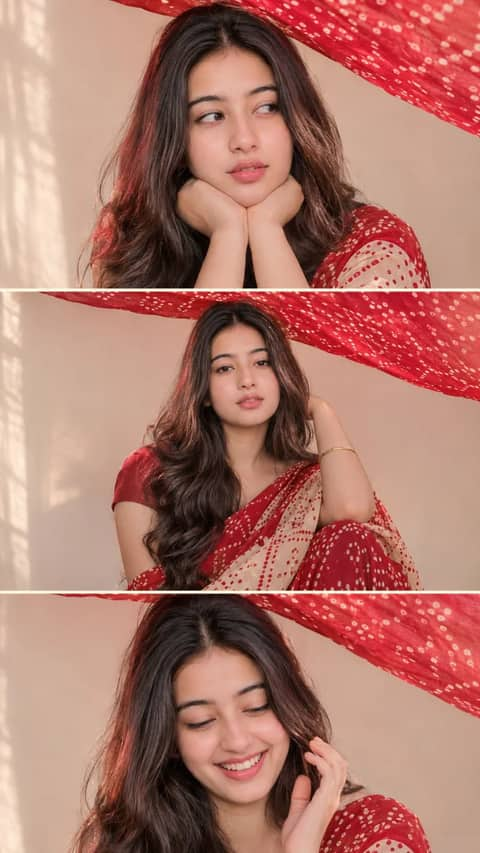
A three-frame photo story beneath red bandhani fabric, from a sideways glance to a candid smile. Made for ChatGPT or Gemini.

Quick workflow
Copy the prompt, customize any details, and generate in ChatGPT or Gemini.
Open ChatGPT or Gemini in your browser or app.
Upload your selfie to use your own face (or skip to make a new character).
Copy the prompt card above and paste it into the chat.
Press send to generate. Adjust any details you want.
Browse our curated library of tested AI image prompts or filter by your favorite tool.
Guide
This prompt produces a vertical 9:16 three-frame editorial photo collage of an Indian woman draped beneath a red dotted bandhani textile, moving naturally from a quiet sideways glance into an open smile. Stacking three moments into a single output gives you a cohesive triptych that looks like a scanned magazine layout rather than an isolated AI render.
Multi-frame prompts often collapse when the generator blends everything into one messy image. To prevent that, this prompt specifies: "stack three horizontal photographs in equal thirds with narrow cream dividers." Giving the divider a specific off-white tone—cream instead of default white—prevents the generator from bleeding the bottom edge of one frame into the top edge of the next.
The red bandhani cloth stretches diagonally overhead through every shot. That single visual anchor holds the composition together while the camera frames shift:
Camera settings make a big difference here. Prompts that lean on hype words like "photorealistic" or "ultra-detailed" almost always produce plastic, over-smoothed skin. Setting full-frame 35 mm, f/3.2, 1/250 s, ISO 320 forces a realistic depth of field. At f/3.2, the tiny tie-dye dots and the gold bangle stay sharp, while the cream wall behind her drops into soft focus without turning into a digital blur. The ISO 320 tag introduces fine analog texture that keeps the forehead and cheekbones looking like genuine human skin.
Anchor consistent clothing with directional flow
When prompting multi-panel images, name one continuous prop—like the diagonal bandhani cloth here—that runs through the whole scene. It forces the model to keep the color, weave, and pattern identical across all three crops.
Both supported platforms handle this prompt well, but their strengths differ when dealing with multi-panel division and face references.
GPT IMAGE 2.5 follows structural instructions with great precision. When you upload a reference photo and tell it to preserve facial proportions across three stacked panels, it holds the hairline, jawline, and skin tone steady across each crop. It also honors the cream divider lines reliably. Its main tendency is over-saturating the red cloth, which can occasionally tint the woman's face too heavily.
Nano Banana Pro produces superior fabric translucency and skin subsurface scattering. The way daylight filters through the red cotton drape, casting a gentle warm glow along the neck and collarbone, looks grounded and realistic. However, Nano Banana Pro is more prone to merging frames into a single continuous image. If it drops the dividers, reinforce the layout by numbering the panels as [Frame 1 - Top], [Frame 2 - Middle], and [Frame 3 - Bottom].
Choose GPT IMAGE 2.5 for strict identity lock
If you upload an image reference and need every single panel to look like the exact same person, GPT IMAGE 2.5 preserves facial features with fewer distortions across multiple framing angles.
Working with deep red textiles, hands near the face, and three separate camera crops introduces a few common failure points.
Red bounces hard in AI image generators. Left unchecked, the model will tint the subject's teeth, eyes, and the background wall deep magenta.
If the output groups two frames together or generates vertical strips instead of horizontal ones:
9:16. A square 1:1 or wide landscape canvas forces the model to squish or drop frames entirely.three equal horizontal cuts, exactly 33% height each.Both the top and bottom frames feature hands close to the face. AI models struggle with hands whenever finger placement is left vague.
Next ideas
 ChatGPTModel:GPT IMAGE 2.5